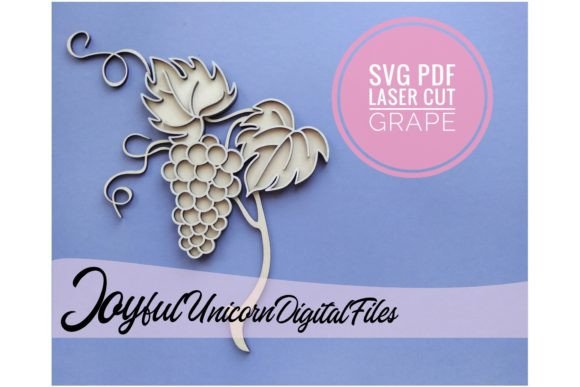
Grape SVG Laser Cut File for Glowforge
Imagine bringing the delicate, cascading beauty of a grapevine to life in wood, paper, or acrylic with perfect precision. This is the creative promise of the Grape SVG Laser Cut File for Glowforge, a versatile digital asset designed to transform your crafting and design projects. Whether you're a seasoned laser cutting enthusiast or a designer exploring new dimensions, this file offers a seamless way to incorporate organic, elegant botanical elements into your work.
This isn't just a simple image; it's a meticulously crafted design file optimized for popular cutting machines. As a digital download, it provides instant access to a professional-grade design asset. The package includes both an SVG file for scalable, clean cuts and a PDF for easy reference, ensuring compatibility and convenience. You can use it with Glowforge, Cricut Design Space, or Silhouette Studio (Design Edition), making it a flexible tool in your creative arsenal. The total design height is 23 cm (9 inches), a substantial size perfect for standout pieces.
Creative Applications for Your Projects
The true value of this file lies in its application. It’s more than a cut file; it’s a component for building brand identity and polished visual presentations. Consider these practical use cases:
- Custom Packaging & Labels: Create stunning, tactile labels for artisan goods, wine bottles, or gourmet products. The grape motif instantly communicates quality and natural ingredients, enhancing your packaging design.
- Home Décor & Wall Art: Cut the design from plywood or acrylic to produce beautiful, layered wall hangings, signs, or decorative panels. It adds a touch of modern botanical elegance to any space.
- Event Decor & Invitations: Design intricate place cards, table numbers, or wedding invitations that will leave a lasting impression. The file’s precision ensures every delicate leaf and vine is perfectly rendered.
- Branding & Merchandise: Use the motif to create unique logos, hang tags, or branded merchandise for businesses in the food, wellness, or lifestyle sectors. It helps establish a recognizable and sophisticated brand identity.
Tips for Seamless Integration and Design
To get the most out of this or any premium font or design file, a thoughtful approach is key. First, always consider the material. While the file suggests 1/8'' plywood, don’t hesitate to experiment with cardstock, leather, or veneer for different textures and effects. The SVG format ensures clean lines regardless of the medium.
Think about font pairing and overall design consistency. If you’re incorporating text into your project, choose a typeface that complements the organic, elegant style of the grape motif. A clean sans-serif font can create a beautiful contrast, while a classic serif might enhance a traditional feel. This attention to detail elevates your project from a simple craft to a piece of professional design.
Finally, ensure you understand the file you’re purchasing. This is a digital cut file, not a physical product. After purchase, you’ll download a ZIP archive that you need to extract. If your computer doesn’t recognize the SVG file, it may appear as an HTML file with a Chrome icon—this is a common quirk, but the file will still open correctly in your Glowforge or Cricut app. Always verify the license to ensure it fits your intended use, especially for commercial projects.
Choosing a well-designed digital asset like this grape SVG file is an investment in the quality and efficiency of your creative workflow. It provides a reliable foundation for projects that require a touch of natural sophistication, helping you achieve consistent, professional results that truly stand out. It’s a small detail that makes a significant difference in the final presentation of your work.